 CoNode

Stock, production and equipment, with AI
Different AI apps, the same shared data.
Ann uses Claude and Ben uses ChatGPT, yet both see the same stock sheet. When one says "10 more milk came in", it shows up for everyone right away.
Free for up to 5 people. Sign in with your work email, Google or GitHub.
Connects to the AI apps your team already uses
- Claude
- ChatGPT
- Gemini
- Grok
Why CoNode
Why it is safe to let AI work in your tables
- 5 peoplefree, no card needed to start.
- 4 AI appsClaude, ChatGPT, Gemini and Grok all connect by adding one address.
- 14 field typesValues that make no sense, like stock of -5, are never saved.
- Every changeYou see whether a person or which AI changed it, and you can undo it any time.
CoNode is for business records such as stock, production, equipment and documents. The AI only reads and writes the table data you ask for. It never rates, hires or makes any decision about people.
Product
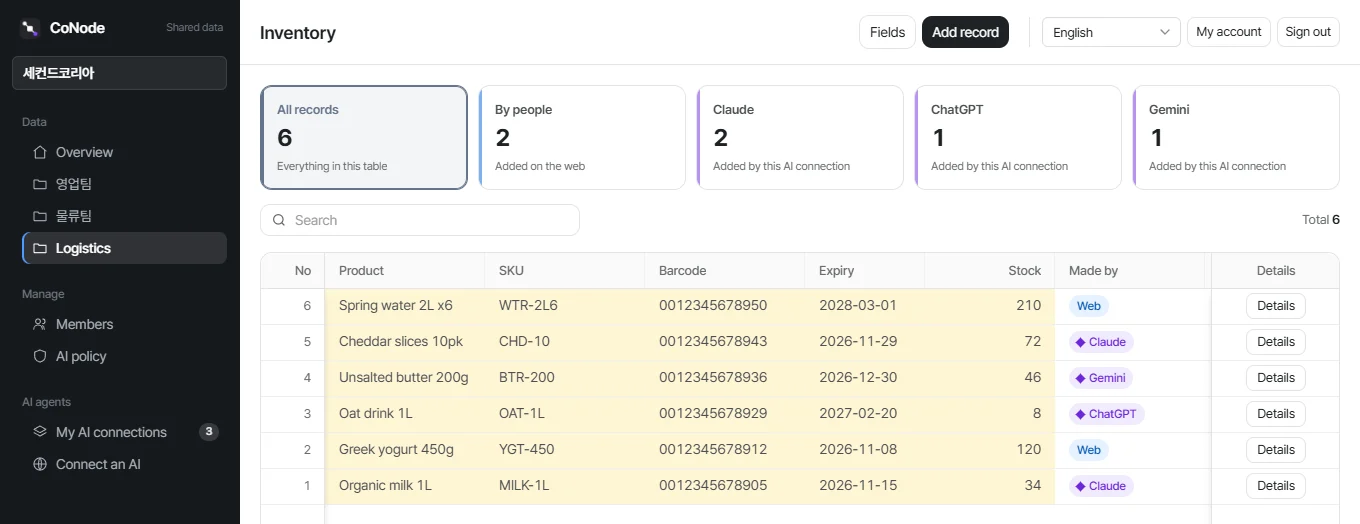
You can see which AI changed what
A real CoNode screen. The cards on top count who added the rows: a person on the web, Claude, ChatGPT or Gemini.
How it works
From one sentence to a table the whole team uses
-
Set up your company
Sign up, add a section for each team such as Logistics or Admin, and invite the coworkers who will use it.
-
Connect your AI
Add one address in Claude, ChatGPT, Gemini or Grok and sign in once. Choose whether the AI may only view or also write.
https://mcp.conode.net/mcp -
Say what you track
Your AI picks the columns you need and makes the table.
We'll track inventory here: product, SKU, barcode, expiry date and stock.
-
Everyone works in it
Everyone looks things up and writes them down with their own AI. Even when several people receive goods at once, the counts stay right.
10 more MILK-1L just arrived.
On the web
Works like a spreadsheet on the web, too
- Your Excel filePick the file and its columns become fields and its rows are imported. No table to design first.
- FormulasWrite quantity × price once and every row calculates itself. Sort, filter and total by it.
- DashboardCollect totals and charts as cards. The numbers are fresh every time you open it.
- QR and phonePost a task link as a QR code on site, and open CoNode from the phone home screen.
CoNode
What CoNode covers
Each page explains one part in detail, and only describes what the product does today.
Features
Tables with 14 kinds of columns including formulas, a dashboard of totals and charts, business documents such as quotations, files, Excel import and export, alerts, comments, undo, search across everything, and task links with QR codes that hand one job to someone without an account.
Read moreExamples
Inventory, production, equipment, service requests, purchasing, contracts, projects and quotations, with the sentences people actually say.
Read moreAI connections
One address for Claude, ChatGPT, Gemini and Grok. For each AI you choose which teams it sees, what it may do and for how long.
Read moreSecurity
Permissions per team, limits on what any AI may do, a person's check before big changes, and a record of every change.
Read morePricing
Free for up to 5 people. Team and Business plans by headcount, with more file storage and documents.
Read moreHow it works
A five-minute setup guide, connection steps for each AI app, what you can do on the web, and answers to common questions.
Read moreStart with one table today.
Invite four teammates for free and connect whichever AI each of them uses.