 CoNode
Who can see and change what, and how you know
Every request, from the web or from an AI, is checked against the person's role and the AI connection's limits, and what happened is recorded.
Three checks on every request
- The person's role. Viewer, editor or manager in each space. Workspace owners and admins manage every space.
- The AI connection. The spaces, actions and expiry the person chose when connecting.
- The workspace AI policy. The limits admins set for every AI, including which actions need a person's approval.
An action happens only if all three allow it. If one doesn't, the request is refused, and the refusal is recorded with its reason.
Who can do what
| Viewer | Editor | Space manager | |
|---|---|---|---|
| Look up records | ✓ | ✓ | ✓ |
| Add, change, adjust counts | ✕ | ✓ | ✓ |
| Create tables and fields (also by talking) | ✕ | ✕ | ✓ |
| Invite people to the space | ✕ | ✕ | ✓ |
| Make and edit documents | ✕ | ✓ | ✓ |
| Publish document templates | ✕ | ✕ | ✓ |
| Rename or archive tables | ✕ | ✕ | ✓ |
| Comment and mention | ✕ | ✓ | ✓ |
| Restore from the trash | ✕ | ✓ | ✓ |
| Set table alerts | ✕ | ✕ | ✓ |
| Approve AI requests in the space | ✕ | ✕ | ✓ |
Viewers can read comments; leaving one needs edit rights. Whether editors may delete records is set per space.
Workspace owners and admins manage every space: they can create or archive spaces and decide whether editors may delete records in a space.
You can see which AI changed what
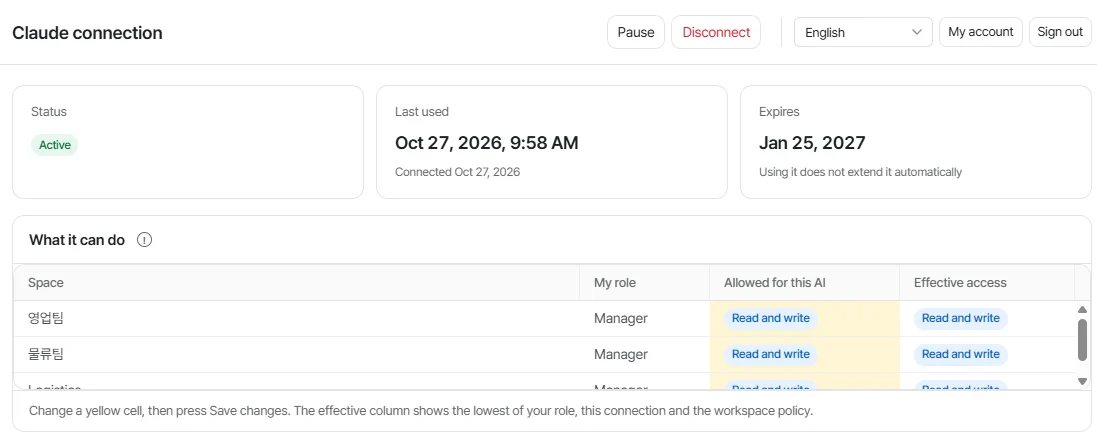
- An AI never gets more than its person
- A connection is limited to the spaces and actions its owner allows. A viewer's AI can only read.
- Nothing is silently overwritten
- If two people edit the same record, the second is asked to check first. Every change keeps its history.
- Refusals are recorded too
- When an AI tries something outside its permission, CoNode blocks it and writes down why.
- Important actions wait for a person
- Admins can require approval before an AI deletes, adds many rows, makes documents or changes tables.
- Every mistake can be undone
- Put any record back to an earlier version, or restore it from the trash.
A record of everything
- Every version of a record keeps who changed it, when, and whether it came from the web or from which AI connection.
- The activity log lists changes across the workspace: records, tables and fields, members and invitations, AI connections and the AI policy, documents and templates.
- Refused requests are logged with the reason, such as outside the connection's scope or blocked by the AI policy.
- Archived spaces and tables disappear from the web and every AI app, but their records and history are kept.
Your data
- All traffic uses HTTPS. Where data is stored and who processes it is listed in the Privacy Policy.
- CoNode does not receive your conversations with your AI app, does not sell data or show ads, and does not use your content to train AI models.
- Files open only for people who can read their table. Links given to an AI work for 10 minutes.
- Mention emails go only to people who can see the record, so a mention never reveals a record to someone outside it.
- Export any table to Excel or CSV at any time. If you ask us to delete your account or workspace, we do it within 30 days.
Sign-in
- Sign in with your work email and a password, or with Google or GitHub.
- Passwords are hashed with PBKDF2 and sign-in sessions are stored only as hashes. A session ends after 14 days without use.
- AI apps connect with OAuth. The app receives a token for that one connection, never your password, and the token stops working when you disconnect.